Benefits to childcare centres
- Reduced chargebacks
- No cost or effort to implement
- An additional layer of security
- Greatly reduces fraudulent transactions
3DS (3D Secure) is an additional layer of security and fraud protection for card payments. Here is how it works on ChildCare EasyPay, what it means for your centre and families, and answers to the questions parents ask most.
3DS means the card issuer may ask the cardholder to enter a code when making a payment. The issuer decides whether to challenge the cardholder, based on its own fraud control algorithms.
If the cardholder is challenged, a code is sent to their mobile. They enter it to continue, and the payment is only processed once the code is entered. When the card is verified, the payment is authorised and the transaction completes.
3DS applies on all customer payment pages hosted by ChildCare EasyPay, where the address starts with pay.childcareeasypay.com.au, and when your software uses the ChildCare payment plugin.
3DS is triggered during the transaction. This is the flow a parent sees when paying by card.
The parent pays by card on a ChildCare EasyPay payment page.
ParentThe card issuer's fraud control algorithms decide whether to challenge the cardholder.
Card issuerIf challenged, the issuer sends a one-time code to the cardholder's mobile.
If challengedThe ‘enter your code’ fields appear on the page and the parent enters the code.
If challengedOnce the card is verified, the payment is authorised and the transaction is completed.
Complete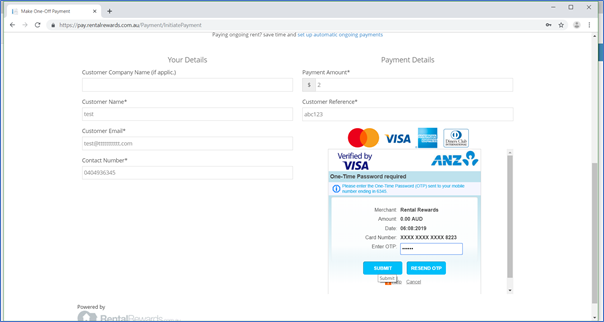
3DS protects both sides of the payment, with nothing for your centre to set up.
If a payment is declined or a code doesn't arrive, the card issuer is usually the right place to start.
3D Secure is triggered by the card issuer, to give extra protection against unauthorised use of a card. Not all credit cards are 3DS enabled; this is at the discretion of the card issuer.
They will need to contact their card issuer to make sure their contact details for 3D Secure are correct. Some banks have not implemented 3D Secure.
The 3DS ‘enter your code’ fields appear automatically when 3DS is supported and is presented by the bank that issued the parent's card. The bank's fraud algorithm decides whether or not to challenge the cardholder.
3DS is available for Mastercard, Visa and American Express cards. Whether it is configured for every card, and whether a code is required, is at the discretion of the card issuer.
The card issuer decides whether the cardholder is challenged to enter a 3DS code, based on its fraud control algorithms.
ChildCare EasyPay does not decide whether a cardholder is challenged, does not check whether the code entered is correct, and does not decide whether the transaction is approved.
Under no circumstances should you process credit card payments over the phone without sighting the credit card.
The cardholder will need to contact their card issuer to check whether their card requires 3D Secure.
No. Verification codes are one-time only. The card-issuing bank sends a new one each time.
Parents should contact their card issuer to find out why the payment was declined.
3DS is available on all customer payment pages hosted by ChildCare EasyPay. The page address will contain pay.childcareeasypay.com.au.
3D Secure is also known as Verified by Visa, Mastercard SecureCode and American Express SafeKey.
Talk to the ChildCare EasyPay team about card payments and 3DS for your centre. Our Mascot team sets you up and supports you.
Thanks, the ChildCare EasyPay team will be in touch.